

Joining Your Node to a Realm
Connect your Hecate node to your organization's identity and trust boundary.
What is Realm Joining?
A Realm is your organization's namespace in Macula. It holds your identity, apps, certificates, and trust relationships. Every Hecate node must join a Realm before it can participate in the mesh.
Identity
Your node gets a signed certificate from your Realm
Trust
The Realm knows this node belongs to you
Connectivity
Discover and communicate with peers in your Realm
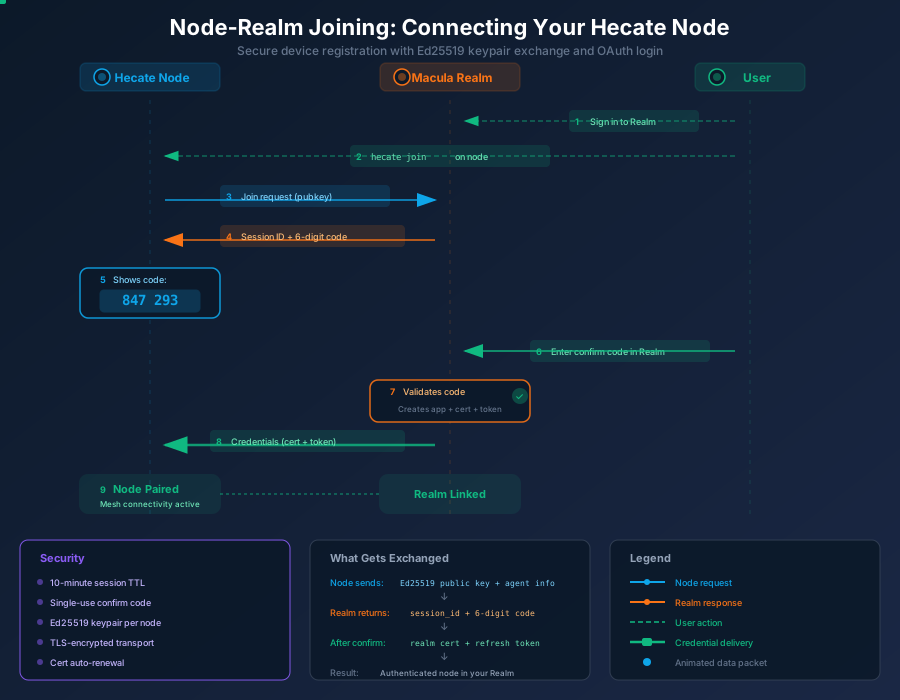
The Join Flow
Prerequisites
-
macula-cli or macula-station installed
See the Install guide
-
A Realm account
Sign in with your passkey to create one
-
Network access
Your node must reach macula.io over HTTPS (port 443)
Step-by-Step
Sign in to your Realm
Initiate join from Hecate
Click "Join a Realm" in the Hecate desktop app, or run in a terminal:
hecate joinOpening browser to complete login...Waiting for login... (expires in 10 min)Log in via your browser
Node receives credentials
The daemon polls in the background. Once you log in, the node receives its credentials:
Joined successfully! Node: hecate-abc123 Realm: io.macula.yourname Cert: valid until 2027-02-27Your node is now part of the mesh.Security Design
The join flow uses OAuth device authorization. No secrets cross the wire — only the public key leaves the node. Logging in via OAuth from the same device is sufficient proof of intent.
Troubleshooting
The join session is valid for 10 minutes. If it expires, click "Join a Realm" again to start a new session.
If your node is already joined to a realm, leave the current realm first, then join again.
Verify your node can reach macula.io:
curl -I https://macula.io/api/v1/auth/healthYou should get a 200 OK. Check DNS, firewall, and HTTPS (port 443).
Leave the realm and join again. Make sure you are signed in to the correct Realm in your browser before the join flow completes.